# Editing a File
Click a file's name from a folder's page to open it in the editor -- a WYSIWYG toolbar on the left for HTML files (plain code files open directly in a text editor instead), and a details/actions panel on the right.
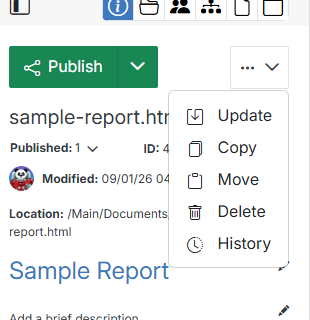
**Name** | **Description**
:--- | ---
Name | Click the pencil icon to rename the file.
Published | The file's live status and its ID.
Modified | Who last changed the file, and when.
Location | The file's full path. Click to copy it.
Title / Description | Click the pencil icon on either to add or update them.
## Publish, Stage & Draft
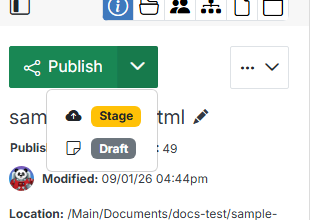
**Name** | **Description**
:--- | ---
Publish | Push your current edits live immediately.
Stage | Save your edits to a staging version, without publishing them.
Draft | Save a private draft, visible only to you and other editors, without staging or publishing.
## More actions
Click the **...** menu next to Publish for actions on the file itself:
**Name** | **Description**
:--- | ---
Update | Change the file's title, description, and publish/expire scheduling.
[History](/documents/document-overview/history/) | Review and restore a previous version.
[Copy](/documents/document-overview/copy/), [Move](/documents/document-overview/move/), [Delete](/documents/document-overview/delete/) | Same as selecting the file's row checkbox from the folder's page.
## Icon row
The icons above the details panel switch between its different views:
**Name** | **Description**
:--- | ---
Info | The details panel shown above (the default view).
[Replace File](/documents/document-overview/replace-file/) | Upload a new file to overwrite this one's contents.
Tasks | Create and assign tasks on the file, and track their status.
Includes | Lists the pages this file is included on, if any.
Attachments | Attach other files to this one.
Events | Map calendar entries to this file.