# Workflow
Automatically email someone when a submission comes in -- optionally only when a specific field matches a value. From the form's overview page, open the **...** menu and click **WorkFlow**.
This is the same underlying automation engine as the org-wide [Workflow settings](/admin/settings/workflow/) -- opening it from a form just pre-scopes a new rule to this specific form. A Module Form is a [datatable-style module](/modules/add-module/#calendar-vs-datatable-modules) under the hood, so its Type dropdown is the same one described in [Module Overview's Workflow](/modules/module-overview/workflow/#datatable-style-modules-manager-group--task--form-submission) -- **Form Submission** below is the type you'll use most, but **Submitted by user**, **Submitted by user from group**, and **Value contains** are also available, plus the Task triggers described on the [global Workflow page](/admin/settings/workflow/add-workflow/#task-triggers-completed-by-user-completed-by-user-from-group).
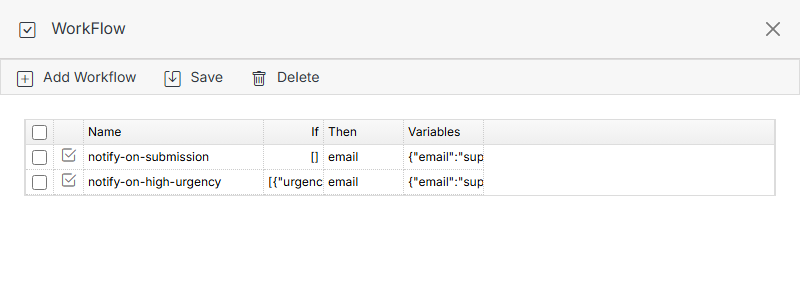
**Name** | **Description**
:--- | ---
Add Workflow | Create a new workflow rule.
Save | Save changes to the workflow list.
Delete | Select a workflow's checkbox, then click Delete to remove it.
## Add Workflow
**Example:** notify the support team by email only when a submission's Urgency field is "High".
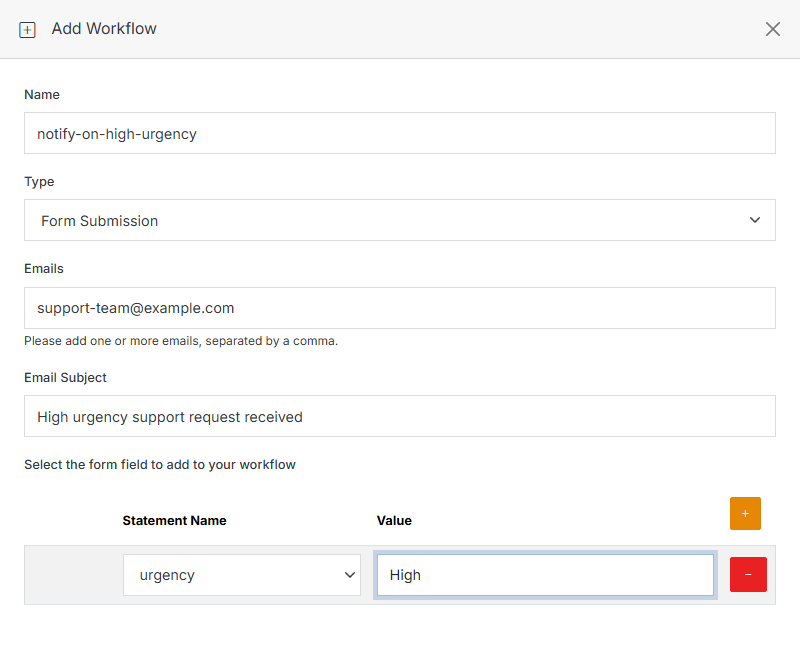
**Name** | **Description**
:--- | ---
Name | The workflow's internal name.
Type | **Form Submission** for the example below. No type is pre-selected -- pick one from the dropdown.
Emails | One or more email addresses, comma-separated, to notify.
Email Subject | The subject line of the notification email.
Select the form field to add to your workflow | Optional. Click **+** to add a condition: pick a **Statement Name** (one of this form's own schema fields) and the **Value** it must match for the email to send. Leave this empty and the email sends on every submission, with no condition.
Submit to save. The list shows each rule's **If** (the condition, or `[]` if unconditional), **Then** (the action -- `email`), and **Variables** (the notification details) as raw data, matching what's stored.