# Organization
In your Organization, you can manage the individual users in your CMS, create groups and invite members, build custom contact lists, and configure AI Agents.
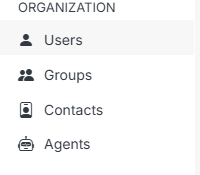
There are four main sections in your Organization. Each can be accessed using the left navigation:
 **Name** | **Description**
:--- | ---
Users | View, manage, and invite users to your CMS.
Groups | Create groups, add members to your group, and manage their roles and permissions.
Contacts | View, manage, add, and update contacts in your CMS.
Agents | Create and configure AI Agent workspaces that can act on your CMS.
!!!Tip:
You can manage individual user and group access across all your websites and apps at multiple levels using permissions.
!!!
**Name** | **Description**
:--- | ---
Users | View, manage, and invite users to your CMS.
Groups | Create groups, add members to your group, and manage their roles and permissions.
Contacts | View, manage, add, and update contacts in your CMS.
Agents | Create and configure AI Agent workspaces that can act on your CMS.
!!!Tip:
You can manage individual user and group access across all your websites and apps at multiple levels using permissions.
!!!