# File Overview
Under **web files**, you can update folders or open a specific file to edit it with the code editor. This includes template files (.tpl), config files, package.json, form assets, and other components that power your website's structure. Click on a file to open it.
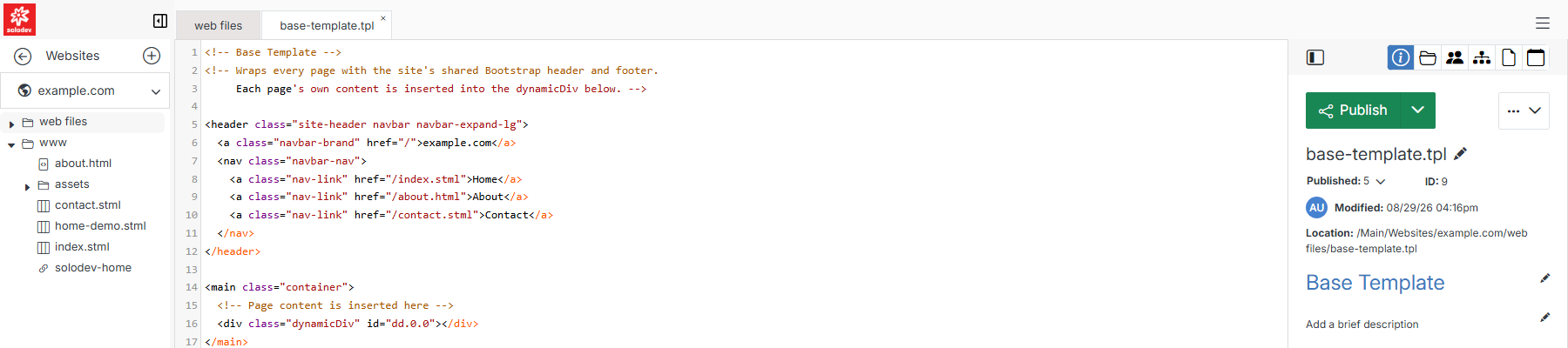
Once a file is open, its actions are split across three groups: the workflow-status button, the **...** actions menu, and an icon row above them both.
## Publish, Stage & Draft
**Name** | **Description**
:--- | ---
[Publish, Stage & Draft](/websites/file-overview/publish-stage-draft/) | Push the file's code or content to live production, stage it for review, or save it as a draft.
## Actions menu
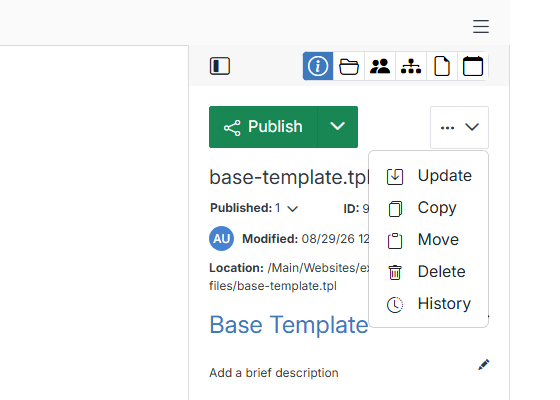
Click the **...** button next to **Publish** for file management actions.
**Name** | **Description**
:--- | ---
[Update File](/websites/file-overview/update-file/) | Change the file's title, description, and publish/expire scheduling.
[Copy File](/websites/file-overview/copy-file/) | Copy the file for editing or reuse elsewhere in your website.
[Move File](/websites/file-overview/move-file/) | Relocate the file based on your taxonomy.
[Delete File](/websites/file-overview/delete-file/) | Permanently delete the file from your website.
[File History](/websites/file-overview/file-history/) | Review previous versions of the file, compare them, and restore a saved one.
## Icon row
**Name** | **Description**
:--- | ---
Info | The default right-hand panel: name, published status, ID, modified date, location, and editable title/description.
[Replace File](/websites/file-overview/replace-file/) | Overwrite the current file by uploading a new one.
[Tasks](/websites/file-overview/tasks/) | Track a to-do status for the file and leave comments for your team.
[Includes](/websites/file-overview/includes/) | Review where the file is being used across your website.
[Attachments](/websites/file-overview/attachments/) | Manage files attached to this asset.
[Events](/websites/file-overview/events/) | Map a calendar entry to this file.