
Meta Column

Update your pages's name, add a title and description for better organization, and publish, stage, or save the page as a draft. Other page details are also displayed.
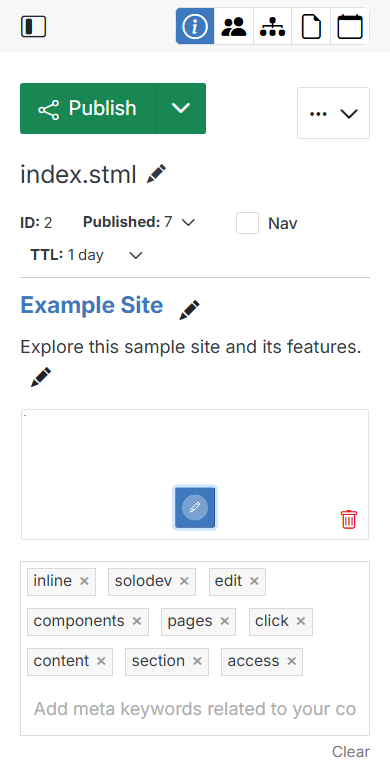
Meta Column

Publish, Stage & Draft

Name Description
Publish, Stage & Draft Push the page's code or content to live production, stage it for review, or save it as a draft.

Actions menu

Click the ... button next to Publish for page management actions.

Name Description
Update Page Change the page's title, description, and publish/expire scheduling.
Copy Page Copy the page elsewhere in your website.
Move Page Relocate the page based on your taxonomy.
Delete Page Permanently delete the page from your website.
Page History Review previous versions of the page, compare them, and restore a saved one.

Icon row

Name Description
Info The default right-hand panel: name, ID, published status, ID, modified date, location, and editable title/description.
Tasks Track a to-do status for the page and leave comments for your team.
Includes Review where the page is being used across your website.
Attachments Manage page attached to this asset.
Events Map a calendar entry to this page.

Page Info

Name Description
Page Name Update the page's name by clicking the pencil icon.
ID View the ID assigned to the page.
Status Dropdown Switch between the available versions of the page to view or edit.
Nav Check the box to include the page in the website navigation.
TTL Dropdown Select how long the page should be cached, from no cache to 1 week.
Page Title Update the page's title.
Page Description Update the page's description.
Page Preview View a screenshot of the page as it appears in the site.
Meta Keywords Add keywords related to the page's content for search engine optimization.