
Update Page

Change a pages's name, description, and publish/expire scheduling without editing its content.

From an open page, click the ... menu next to Publish, then click Update.
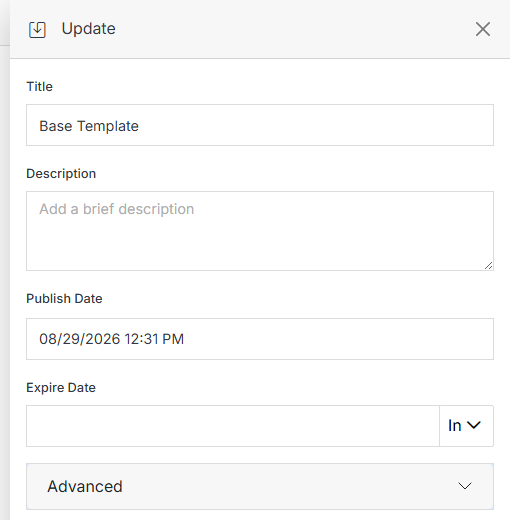
Update panel for a file

Name Description
Title Update the file's display title.
Description Add or update a brief description of the file.
Publish Date Schedule when the file should automatically publish.
Expire Date Choose when the file should expire: never, 1 day, 10 days, 30 days, 90 days, or 1 year.
Advanced Expand for additional scheduling and behavior options.
Submit Once you've made your changes, click Submit to apply them.

Advanced

Click Advanced to customize your page's behavior, appearance, and functionality with granular settings to control rank, manage header code, and more.
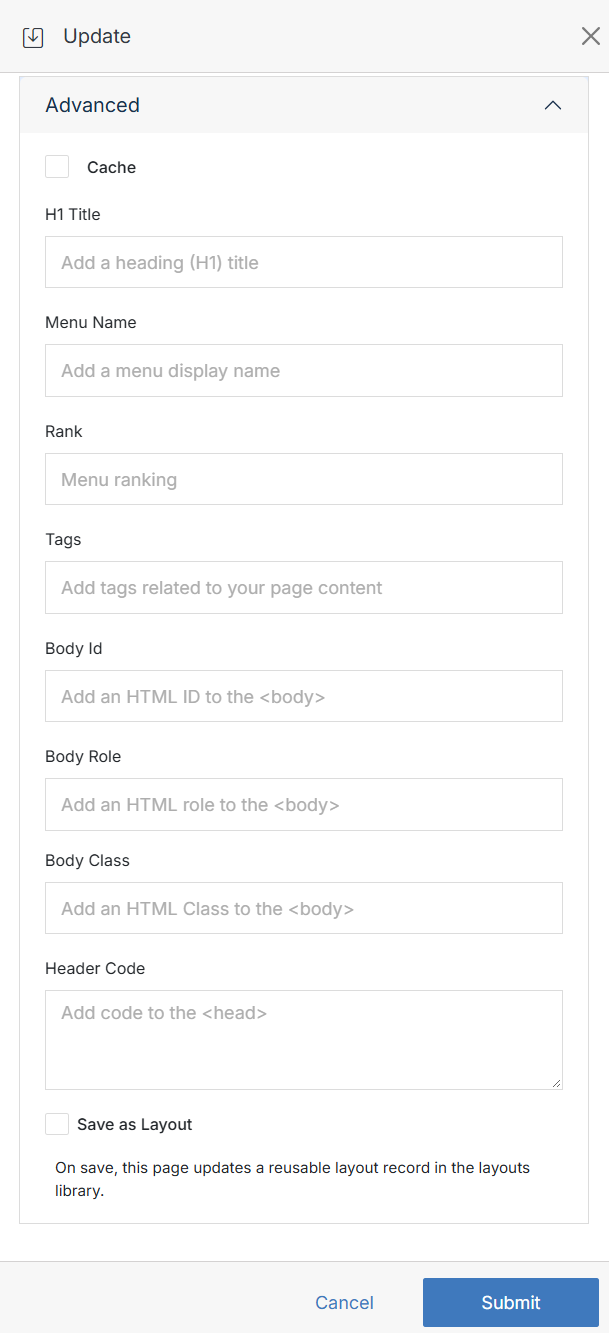
Advanced options on metadata panel

Name Description
Cached If enabled, the page content is cached to improve performance. See Page Cache to set the TTL.
H1 Title The main heading of the page.
Menu Name Specifies how the page is displayed in navigation menus. It can be different from the page's actual title.
Rank Determines the order in which pages are displayed in navigation menus or other listing views.
Tags Keywords or labels associated with the page.
Body Id An HTML attribute that provides a unique identifier for the page's main content area.
Body Role Specifies the role of the main content area in the page's structure, following web accessibility guidelines.
Body Class HTML attribute that assigns one or more classes to the page's main content area.
Header Code Allows you to add custom code to the page's header section.
Save as Layout If enabled, this indicates that the page is a template for other pages.