# Source
Source is the combined tree for everything in your CMS deployment — Websites, Modules, Users, Documents, and Forms all in one place, instead of navigating into each section separately. It's useful when you need to work across the whole system at once: finding an object without knowing which section it lives under, or moving/copying between areas that otherwise live in separate parts of the nav.
 The main catalogs are:
- Websites
- Modules
- Users
- Documents
- Forms
!!!Note:
A catalog only appears in the tree once it contains at least one item -- an empty CMS deployment with no websites yet, for example, won't show a Websites row until you add one.
!!!
**Name** | **Description**
:--- | ---
Source Management | Manage any catalog directly from the combined tree.
---
## Source Management
Click into any catalog to manage it with the same options available from its own section. Use **Search** at the top to find a file without browsing the tree.
The main catalogs are:
- Websites
- Modules
- Users
- Documents
- Forms
!!!Note:
A catalog only appears in the tree once it contains at least one item -- an empty CMS deployment with no websites yet, for example, won't show a Websites row until you add one.
!!!
**Name** | **Description**
:--- | ---
Source Management | Manage any catalog directly from the combined tree.
---
## Source Management
Click into any catalog to manage it with the same options available from its own section. Use **Search** at the top to find a file without browsing the tree.
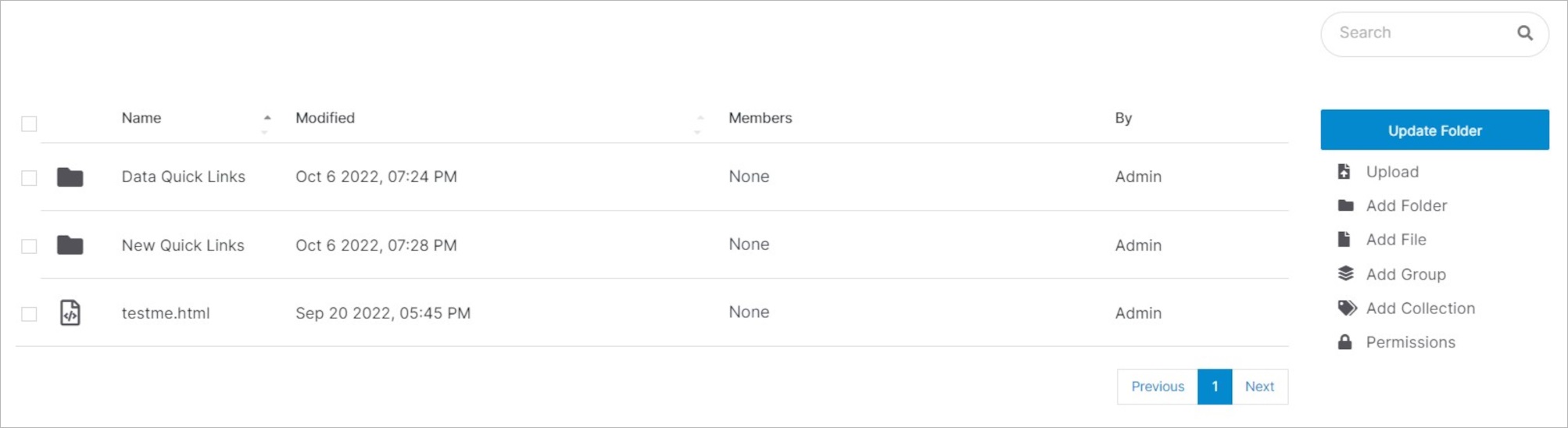 **Name** | **Description**
:--- | ---
Update Folder | Change folder details like name or title and perform advanced functions like deleting a folder.
Upload | Drag and drop or browse files into your folder.
Add Folder | Create a new folder and add specific details like name and title.
Permissions | Manage user access to files and folders with specific roles.
Copy | Creates a duplicate of a file.
Move | Moves the file to a new location.
Delete | Removes a file permanently from the CMS.
**Name** | **Description**
:--- | ---
Update Folder | Change folder details like name or title and perform advanced functions like deleting a folder.
Upload | Drag and drop or browse files into your folder.
Add Folder | Create a new folder and add specific details like name and title.
Permissions | Manage user access to files and folders with specific roles.
Copy | Creates a duplicate of a file.
Move | Moves the file to a new location.
Delete | Removes a file permanently from the CMS.