
Add Page
A page is the basic building block of a website. It acts as a container for your content while providing a general structure based on your layout template and styling.
From an open www folder, click + Add and select Add Page.
STML files
While a page is composed of hypertext markup and served in a browser, all pages in the Solodev CMS are given a ".stml" extension. An STML is an HTML file that contains server-side includes (SSI), which are used to create page-generated content. STML files are processed by the server when a user accesses the related webpage.
Note:
if you're creating an HTML page with a code editor, you need to manually give it an extension of ".stml" before you upload the file to your Solodev CMS.
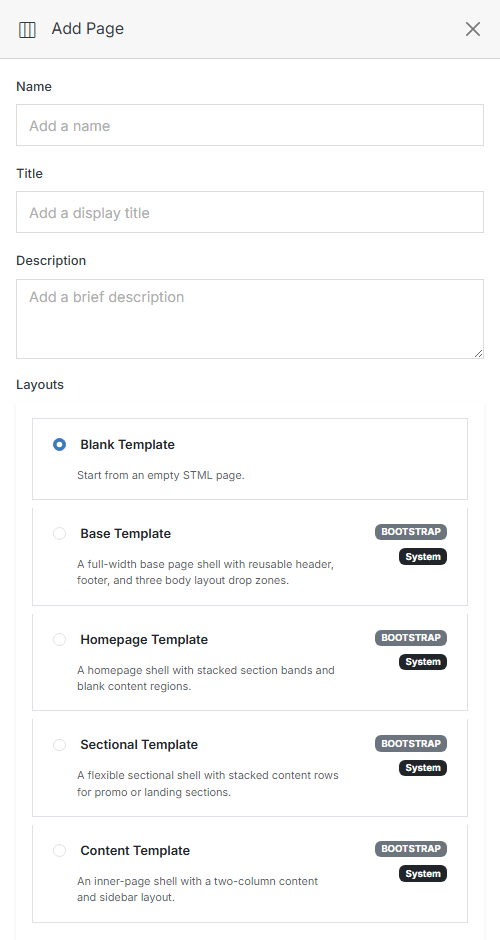
Layouts
The Base, Homepage, Sectional, and Content layouts are built-in Bootstrap system templates — a faster starting point than Blank Template if your page fits one of those common shapes. Once your page is created, see Page Overview for how to build it out with the drag-and-drop component palette.
Which layout fits?
- Homepage is your site's front door, and there's normally only one — it introduces the whole site and often carries a hero banner, a CTA, and links out to everything else.
- Sectional is a high-level jumping-off point for one section of a larger site (think a "Departments" landing page linking out to each department). Used sparingly, and usually styled to stand out from ordinary content pages.
- Content (sometimes called an "interior" template) is the workhorse — it powers the bulk of an ordinary multi-page site and gets reused across many pages that share the same shape.
- Base underlies all of the above — it's the header/footer/tracking-code shell that the other layouts (and any page you build from Blank) are ultimately built on top of.


