
Restrict Access
Password-protect part of a website's frontend so only logged-in contacts can see it. Two pieces work together: a folder-level flag that marks a folder as restricted, and a shortcode that actually enforces the redirect on each protected page.
Mark the folder
Go to the folder you want to restrict, click on the ... menu and open Update, and expand Website Properties. Check Restrict Access in Website to Authorized Users and click Submit.
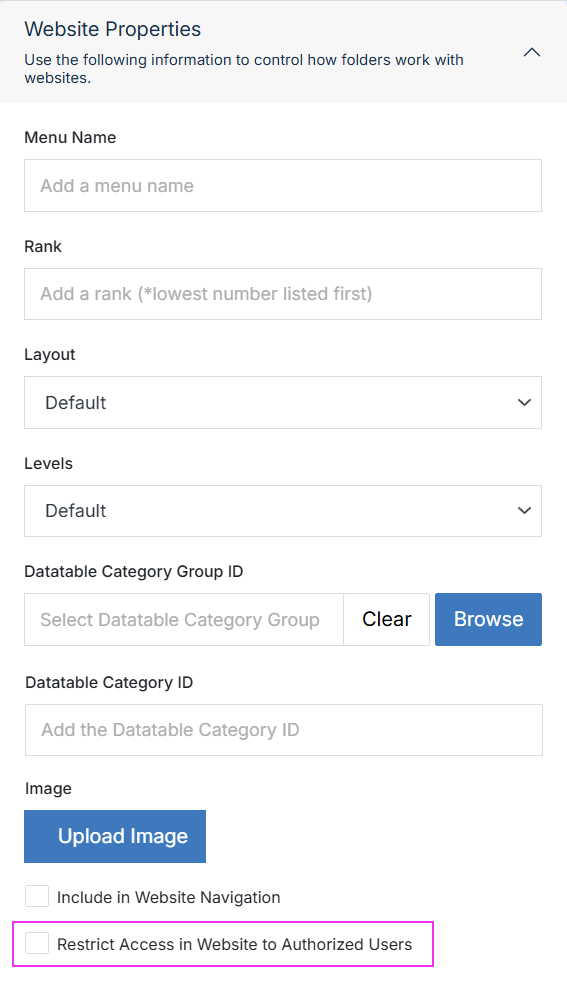
See Update Folder for information on the remaining fields in the form.
Important:
This flag indicates that a folder is intended to be restricted, but it does not enforce the restriction by itself. The actual redirect is handled by the [contact_form_session] shortcode below, which is placed on the pages within the folder.
Enforce it on a page
Add the shortcode provided below to the top of any page that needs to be protected:
[contact_form_session]If the visitor does not have a logged-in contact session, they are redirected before the rest of the page is rendered.
Options:
[contact_form_session forward_to="/login/"]The redirect appends ?next_url= with the page the visitor originally tried to access, allowing the login page to redirect them back after they sign in.
Note:
If a visitor hits a protected page before any login page exists, they'll see a 404 at the default /login.stml. Set forward_to explicitly, or add a page at that path.
Build the login page
- Add a page to hold the login form.
- Add the Contact Form Login shortcode to it, and point
forward_toat wherever a signed-in visitor should land.
Related shortcodes
- Contact Form Login — the login form shortcode itself.
- Contact Form Signup and Contact Form Forgot Password — related shortcodes for a self-service login flow.