
Add File
In Solodev CMS, files serve many purposes, including HTML and code files such as .tpl files. Files are stored in folders and displayed in a Resource View based on their file type.
From the left tree, navigate to and open the folder, click + Add and select Add File.
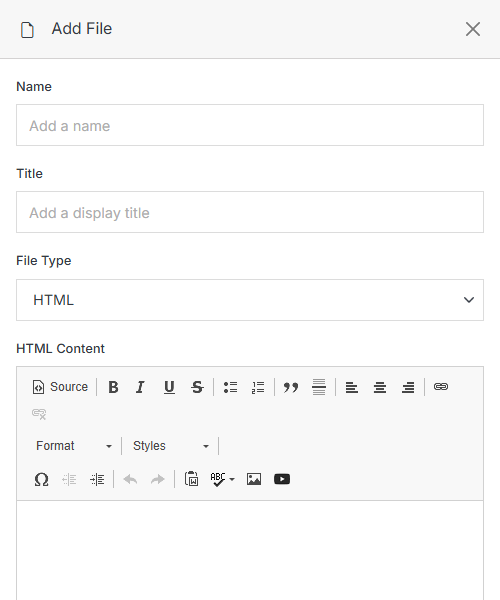
You can add the following file types:
- HTML — Hypertext Markup Language (HTML) is the markup language used to create the foundation of any web page. In Solodev, HTML files are not web pages. HTML pages serve as content blocks that can be organized and embedded into STML pages via Solodev's Dynamic Div technology.
- Template Code — Solodev's text editor supports a wide range of code file types, including .js, .css, .php, .xml, and .json. To use JavaScript or CSS files across all pages, reference the file path in the Global Header Insert found in Update Website.
- README — A plain-text file for documentation or notes within the folder.
- Upload File — Upload a file from your computer.
Embed an Iframe
Use an iframe to display content from another website on your page, such as a video, map, or form. Paste the iframe code into your page's HTML where you want the content to appear.
<iframe src="https://www.example.com/embed" title="Description of the embedded content" width="100%" height="450" loading="lazy"></iframe>Note:
Always include a title attribute that describes the embedded content. Screen readers use it to tell visitors what the iframe contains.
To make the iframe resize with the page, wrap it in a Bootstrap ratio container:
<div class="ratio ratio-16x9">
  <iframe src="https://www.youtube.com/embed/VIDEO_ID" title="Video title" loading="lazy" allowfullscreen></iframe>
</div>
Note:
For a full list of iframe attributes and what they do, see MDN's iframe reference.


